Mini-Split Not Heating After a Mode Change: What to Check Safely
A quiet fan after selecting Heat may be a startup transition. Check the requested mode, the unit’s response and whether the room begins warming before guessing a fault.

Owner & Lead HVAC Technician, Alex Air & Heating · EPA 608 Universal Certified · Ontario, CA
TL;DR
A mini-split may pause or run its indoor fan slowly after switching to Heat while the system changes operation and warms the indoor coil. Confirm that the model can heat, the normal controller requests Heat and the unit responds. Then compare the transition with its manual and watch for room recovery. Persistent no-heat, alerts or safety signs warrant service, not repeated resets.
- Heat mode and fan speed are separate choices; Auto, Dry and Fan do not mean a direct heating request.
- A remote screen shows a request. Use the model’s normal response and room recovery to understand what happened.
- Startup delay and multi-zone restrictions depend on the installed equipment. Record the pattern without opening covers or cycling power.
On this page
- Quick answer: confirm the request, then watch for recovery
- What did you change on the controller?
- The remote display and the indoor unit may tell different stories
- Why warm airflow may not begin immediately
- If the outdoor unit serves several rooms
- When to stop observing and request repair
- A local repair path
Quick answer: confirm the request, then watch for recovery
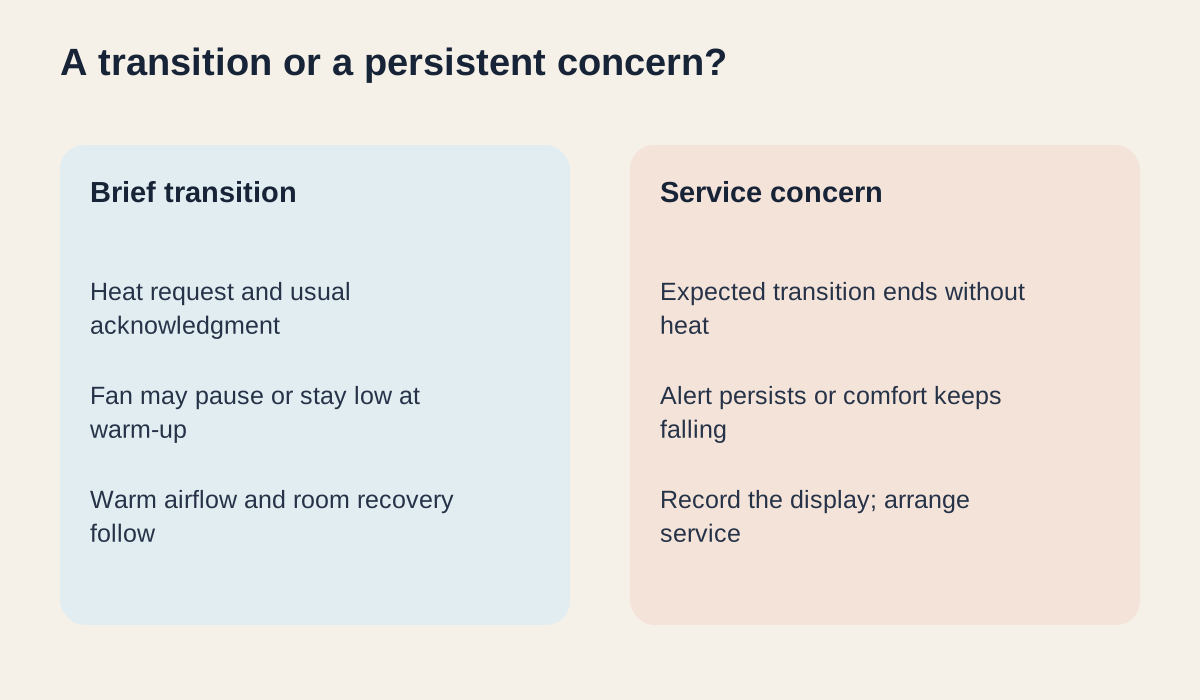
If your mini-split is not heating after switching mode, a slow or paused indoor fan can be part of the change to heating. The unit may protect the compressor after a stop or wait for the indoor coil to warm before sending air into the room. Start with the normal user controls and the equipment manual. A brief transition that ends in warmer airflow is different from a room that keeps getting colder after the expected startup behavior.
What did you change on the controller?
Look for the operating mode itself, not only a fan-speed setting or a temperature number. Heat asks a heating-capable system to warm the room; Cool requests cooling. Fan-only moves air without requesting heat. Dry is intended for moisture control, not a heating call. System Auto can choose an operating mode according to its own logic, while fan Auto controls fan behavior. The words and symbols vary, so use your controller’s instructions rather than assuming every icon means the same thing.
Confirm from the model documents that the installed system has heating capability, especially if you are using a universal or replacement remote. A Heat option on the handset does not give a cooling-only system heating capability. For a normal Heat request, the selected temperature needs to be above the room temperature recognized by the control. Note any timer, schedule or user-facing hold that may explain why the equipment is not responding as expected; do not change installer settings.
| Controller choice | What it generally requests | What to compare |
|---|---|---|
| Heat | Heating when supported and a heating demand exists | Selected temperature, usual unit response and room recovery |
| Cool | Cooling | Whether the previous cooling mode was actually changed |
| Dry | Moisture-control operation | The model’s Dry description; it is not a request for warm air |
| Fan | Air movement without a heating request | Room-temperature airflow is not a failed heating test |
| System Auto / fan Auto | Model-specific automatic mode selection / automatic fan control | Which Auto setting is shown; they are different controls |
The remote display and the indoor unit may tell different stories
A handheld screen often displays the settings you asked for. It is not necessarily feedback from the equipment. From a normal position, note whether the unit gives its usual response when the command is sent, such as a supported indicator or acknowledgment. Not every model beeps or displays its mode, so a missing beep alone does not prove a fault. Keep the normal signal path unobstructed and follow the user manual for ordinary remote use.
If an app or infrared accessory is also used, note which control last changed the mode. Some accessories track the commands they send and can become out of step with changes made on the original remote. Describe the disagreement rather than re-pairing equipment or alternating several controllers as a test. Keep the original remote and controller model information available for the service conversation.

Why warm airflow may not begin immediately
Manufacturer user guides describe startup protection and warm-up behavior on particular models. The indoor fan can stay low or pause while the heating coil warms, even if a higher fan speed was selected. A later heating interruption may instead coincide with defrost; that is a separate operating event. You do not need to identify either event from one sound or one still fan. Note what happened before the pause and whether ordinary heating returned afterward.
Use the interval in the exact manual if it specifies one. Do not apply a fixed online countdown to every unit, raise the setpoint repeatedly or keep switching between Heat and Cool to make the fan start. A useful record begins with the original change and includes when airflow changed and whether the occupied room began warming. If you cannot find the manual and the home is not recovering, contact service rather than waiting indefinitely.
If the outdoor unit serves several rooms
Some multi-zone systems cannot satisfy opposing Heat and Cool requests at the same time. One indoor unit may wait according to the shared system’s priority logic. Other combinations, including Fan or Dry, can also depend on the model. Record what the other controllers show without assuming that every system has the same rule or that an available Auto setting avoids conflicts.
This article covers the transition after a mode change. If the system has already settled into heating and only one room remains cold, that is a different service pattern. Record the affected zone, whether other rooms are warming and the exact indicator behavior. Do not infer refrigerant loss, a sensor defect or a failed valve from the fact that the other rooms work.
| What you notice | What to record | Next action |
|---|---|---|
| Brief slow fan followed by warm air | Mode change, normal indicator and recovery | Compare with the model instructions and keep a note |
| Remote says Heat but the unit seems unresponsive | Controller used, normal acknowledgment and any timer | Check the user instructions; arrange help if it does not respond |
| Heating never returns or comfort keeps falling | Original change time, display and affected zones | Book ductless-system service |
| Smoke, burning odor or water near electricity | Stay clear; do not investigate inside the unit | Stop with the normal controller only if safe and seek prompt help |
When to stop observing and request repair
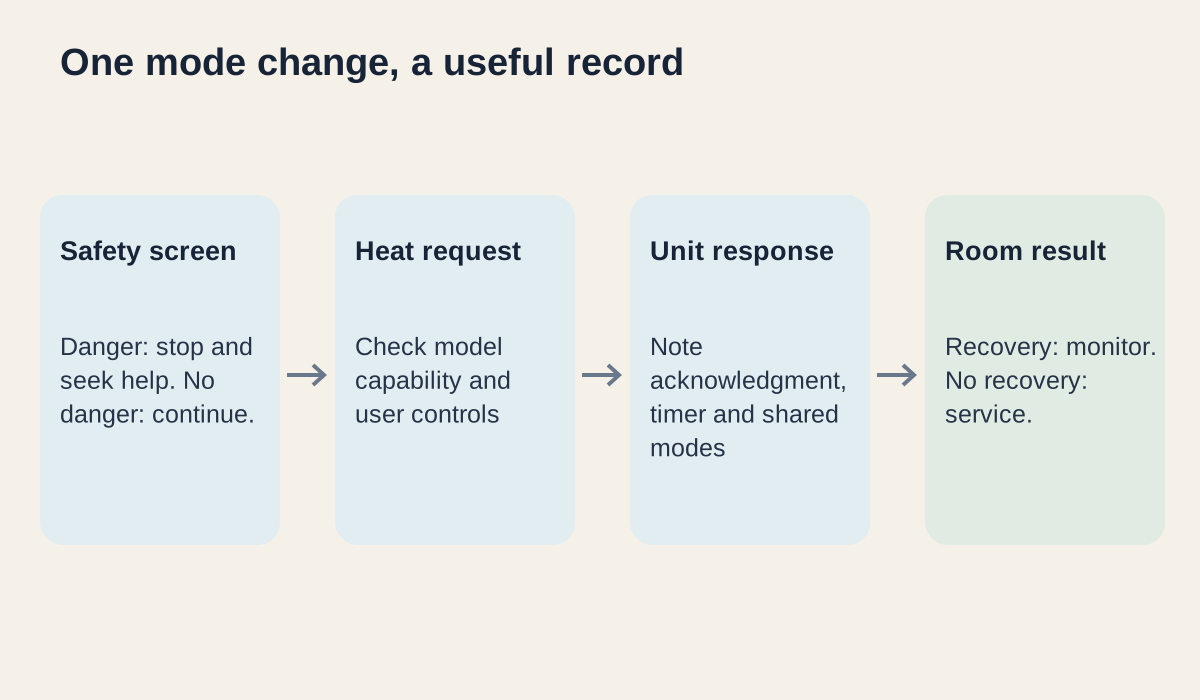
Arrange service when the model’s expected transition finishes without heat, the room keeps losing comfort, an alert persists or the behavior repeats without recovery. A problem that began after control or equipment work is useful context. Give the technician the original mode, requested Heat setting, controller wording, affected rooms and any recording already taken safely. Do not open the indoor head, reach near fans, handle lines, test electrical components or clear an internal drain.
For smoke, burning odor, obvious electrical trouble or water near electrical equipment, keep people clear and stop operation through the normal controller only if it is safe. If fire or another immediate danger is present, leave the area and contact emergency services. Do not restart the system to collect a better recording.
A local repair path
For a mini-split mode change that does not return your Ontario, Pomona, Inland Empire or nearby eastern Los Angeles County home to warmth, request mini split repair. Share the control and room observations rather than a guessed part. If a later pause seems related to outdoor frost, see the separate heat-pump defrost guide. If water is dripping indoors, use the mini-split water-leak guide for the room-protection response.
Frequently asked questions
Some mini-splits hold or reduce indoor airflow while the indoor coil warms, or use a short protection delay after changing operation. Compare with the exact model’s user manual and note whether warm airflow and room comfort return.
No. The remote can show the requested mode even when the command was not received or an operating condition delays the equipment. The model’s usual indicator or response and the room’s change give additional context.
Use the interval and behavior described for your model. There is no universal waiting time for all mini-splits. If the expected transition ends without heat, the room keeps cooling or the pattern repeats without recovery, arrange service.
On some shared-outdoor-unit systems, conflicting heating and cooling requests can place a head in standby. Priority and allowed combinations vary. Note the other rooms’ modes and check the installed system instructions without changing service settings.
Do not cycle power or repeatedly toggle modes to force a response. Keep a record of the original mode change, display and room result. Stop safely and seek help for smoke, burning odor, water near electricity or a recurring protection event.
Local next step
Turn this guide into a site-specific answer.
Guides explain the decision. Equipment condition, access, and safe next steps still need to match the home or business. Review the relevant service scope or request an assessment for Ontario, the Inland Empire, or East Los Angeles County. Availability depends on the current schedule.